


























Gift Box

Get Extra 3 Years of PMP

PMI Logo

PMP Certification Requirements & Eligibility

Prepare for PMP Success: Meet Eligibility Criteria and Fulfill Certification Requirements

Hero Icon

01

Education

35 hours of project management education from a PMI Authorized Training Partner.

Hero Icon

02

Experience

Minimum of 36 months leading projects regardless of industry.

Hero Icon

03

Fees

PMI member fee: $425, Non-member fee: $675 for the PMP exam.

Hero Icon

04

Exam Process

Ensure eligibility, apply, pay fees, schedule, and complete the PMP exam.

Meeting Project Management Professional (PMP) Certification requirements and eligibility criteria can feel overwhelming for project managers. From documenting hours to getting application approval, it's confusing and frustrating.

Throughout this article, we'll delve into the essential aspects of PMP certification, including education requirements, project management experience, exam processes, fees, and more. By the end, you'll have a clear understanding of what it takes to obtain PMP certification and why it's a crucial milestone for project management professionals.

Get in Touch with Us šŸ¤™

Key Takeaways

Understanding the prerequisites for PMP certification is the foundation upon which your journey towards becoming a Project Management Professional (PMP) is built.

Academic & PM Experience

Academic & PM Experience

PMP prerequisites ensure academic and project management experience are aligned with PMI standards.
Academic & PM Experience illustration
PMP Education

PMP Education

Education requirements: Requires high-school or higher to qualify for the PMP exam.
PMP Education illustration
PM Experience

PM Experience

Experience: 5 years with high school; 3 years with a bachelors or higher
PM Experience illustration
35 Contact Hours

35 Contact Hours

35 hours of project management professional education (PMTI course) required
35 Contact Hours illustration
Increase Earning Potential

Increase Earning Potential

PMP certification is a globally recognized credential that enhances career prospects, credibility, and earning potential (33%).
Increase Earning Potential illustration
PMP Exam Costs

PMP Exam Costs

The PMP exam costs $425 for members, $675 for non-members in the US.
PMP Exam Costs illustration

PMP Exam Requirements: Eligibility Criteria and Prerequisites

To be eligible for PMP certification, candidates must meet education, experience, and formal project management education requirements set by the Project Management Institute (PMI). These prerequisites ensure candidates have the necessary foundation in project management principles.

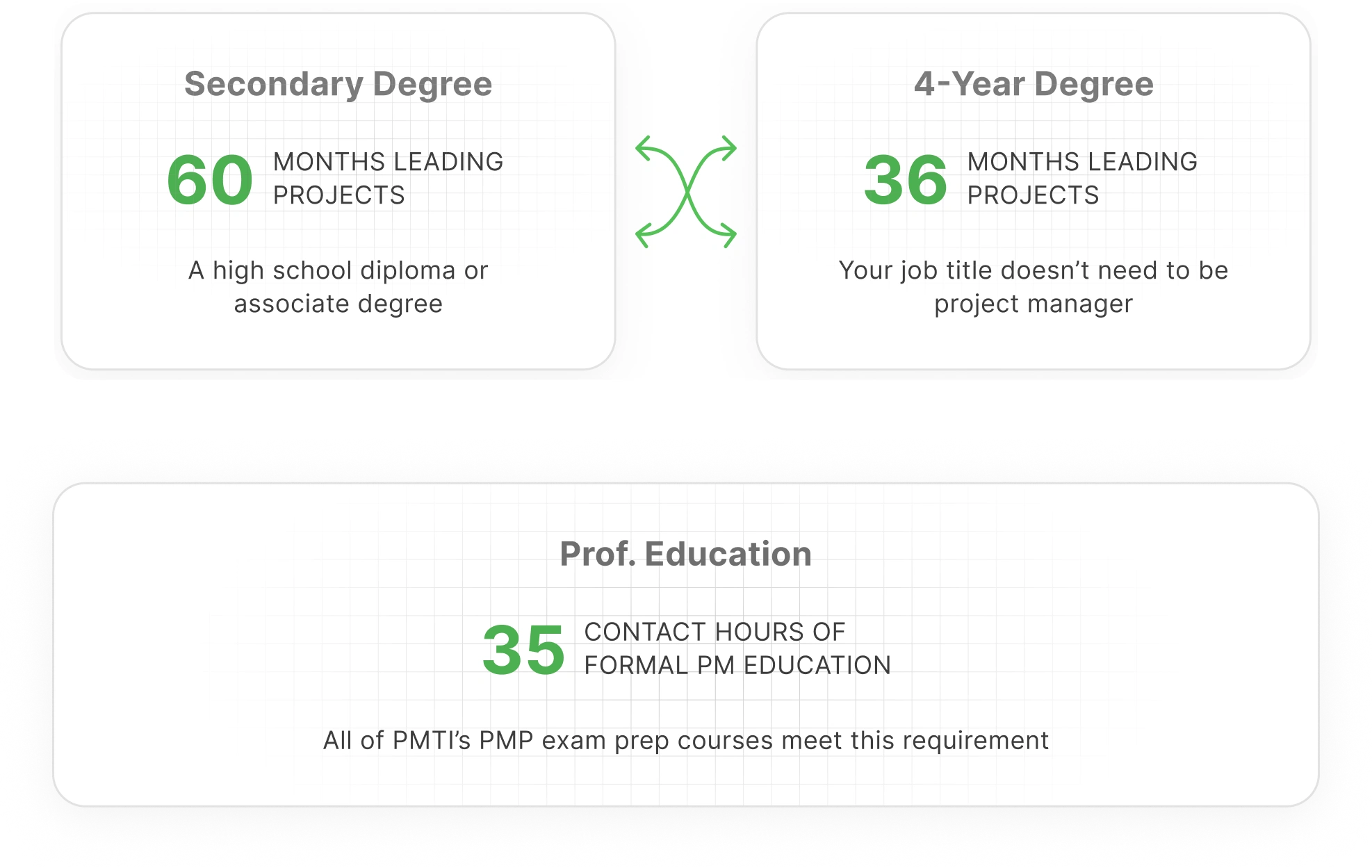
Depending on your educational background, you'll need to meet specific project management experience criteria, such as 5 years with a secondary degree or 3 years with a bachelor's degree. Additionally, completing 35 hours of formal project management education is mandatory.

Academic Education

Candidates must have a secondary degree (high school diploma, associate's degree, or global equivalent) or higher to be eligible for the PMP exam. Alternatively, candidates with a bachelor's degree or higher require fewer hours of project management experience to qualify for the exam.

Meeting the academic education requirement is a fundamental step in the PMP certification process. Without the necessary academic credentials, candidates may not be eligible to pursue PMP certification.
Check Your Eligibility for Free

Project Management Experience

Candidates with a secondary degree must have at least 5 years (60 months) of project management experience leading and directing projects within the last eight years.

Candidates with a bachelor's degree or higher must have at least 3 years (36 months) of project management experience, leading and directing projects within the last eight years.

This experience should encompass various approaches such as agile, hybrid, and traditional project management.
Download a PMP Success Guide

Project Management Education

In addition to practical experience, candidates must complete formal project management education to qualify for the PMP exam. PMI mandates candidates to acquire 35 hours of professional development units (PDUs) or contact hours in project management. This educational requirement ensures that candidates are equipped with comprehensive knowledge and understanding of project management principles and practices. This education specifically focuses on equipping candidates with the knowledge and skills outlined in the PMBOKĀ® Guide and other PMI foundational standards.

These requirements can be fulfilled through PMI Authorized Training Partners (ATPs), PMI chapters, or online courses
Download a PMP Success Guide

Demand for PMP Certification is Growing

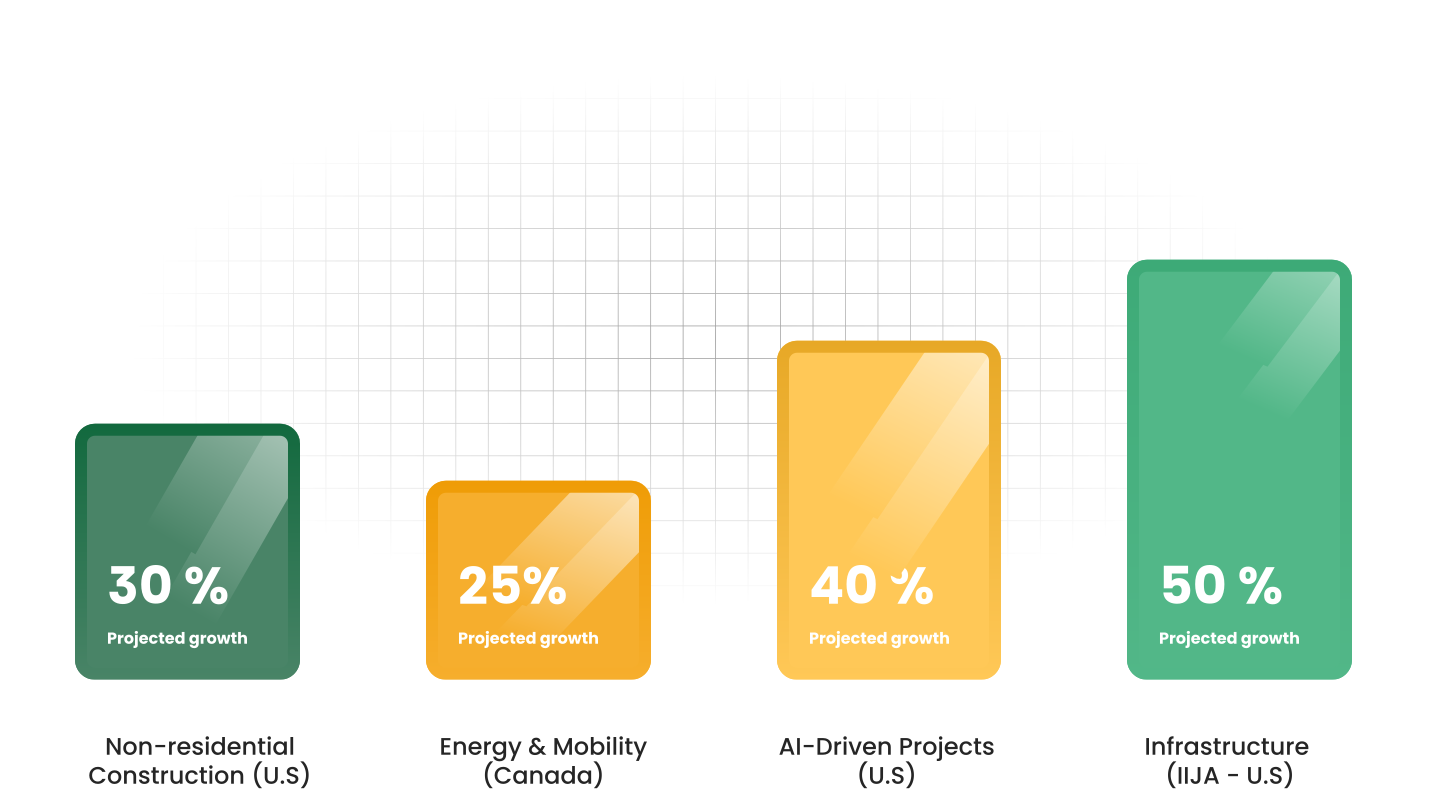
There is a significant rise in demand for project management professionals in the U.S. and Canada, driven by growth and fueled by investments in infrastructure, construction, energy, and AI-driven projects through 2025.

Graph

Get a free Counseling session

Still confused if you qualify for the PMP exam? Get a call back and we will answer all your questions!

CTA Image

What is required for PMI ACP Certification?

PMP certification stands as an indispensable asset in project management, bolstered by concrete industry data and insights from authoritative studies conducted by PMI, Google, and other reputable sources

For professionals focused on Agile methodologies, our PMI-ACP Training covers all aspects of the PMI-Agile Certified Practitioner exam. From Agile tools and techniques to real-world scenario practice, our course ensures you’re fully prepared to earn your PMI-ACP certification with confidence.

Get Certified šŸ˜‰

Industry Recognition

Industry Recognition

PMP certification is globally recognized and respected within the project management community...

According to PMI's Pulse of the ProfessionĀ® report, organizations boasting a higher percentage of ACP-certified project managers witnessed a remarkable 30% decrease in project failure rates.

Career Advancement

Career Advancement

Holding a PMP certification can significantly enhance career opportunities and advancement prospects. Many employers prefer or require PMP-certified professionals for leadership roles and project management positions.

Professional Development

Professional Development

Pursuing PMP certification requires candidates to acquire and maintain a high level of project management knowledge and skills.

Enhanced Credibility

Enhanced Credibility

PMP certification demonstrates a candidate's mastery of project management concepts, processes, and best practices...

Moreover, Google's internal research demonstrates teams led by ACP-certified professionals exhibit a staggering 25% increase in productivity and efficiency, as evidenced by Google's in-depth analysis.

What Do You Need to Get PMP Certification?

To obtain PMP certification, candidates must fulfill specific requirements and meet certain criteria established by the Project Management Institute (PMI).

Education Requirement


Candidates must hold a secondary degree (high school diploma, associate's degree, or global equivalent) or higher to be eligible for the PMP exam.

Project Management Experience


PMP requires 36 months of experience with a 4-year degree, or 60 months without one.

Project Management Education


PMP requires 35 hours of training which can be obtained through PMI ATPs such as PMTI.

Eligibility Criteria


Candidates must meet the eligibility criteria set by PMI, which include a combination of education, project management experience, and formal project management.

Application and Exam


Candidates must submit an application for the PMP exam through the PMI website, pay the exam fee, and schedule their exam appointment at a designated testing center.

Exam Preparation


Candidates should prepare for the PMP exam by studying relevant materials, such as the PMBOKĀ® Guide and other resources, and practicing sample questions to familiarize themselves with the exam format and content.

How to Meet PMP Requirements?

Meeting the requirements for PMP certification involves a strategic approach and careful planning. Here's a step-by-step guide on how to meet PMP requirements:

1

Review Eligibility Criteria

Familiarize yourself with the eligibility criteria set by the Project Management Institute (PMI), which include education, project management experience, and formal project management education.
Step 1: Review Eligibility Criteria
2

Assess Your Qualifications

Evaluate your qualifications against the PMP eligibility criteria to determine if you meet the necessary requirements for certification. Identify any gaps in your education or experience that need to be addressed.
Step 2: Assess Your Qualifications
3

Project Management Experience

If you lack sufficient project management experience, seek opportunities to gain hands-on experience.
Step 3: Project Management Experience
4

Complete Formal Education

Enroll in a PMI Premier Authorized Training Partner (ATP) or an equivalent provider to complete the required 35 hours of formal project.
Step 4: Complete Formal Education
5

Submit Your Application

Once you've met the eligibility criteria, submit your application for the PMP exam through the PMI website. Provide accurate and detailed.
Step 5: Submit Your Application
6

Prepare for the Exam

Prepare for the PMP exam by studying relevant materials, such as the PMBOKĀ® Guide, study guides, and practice exams.
Step 6: Prepare for the Exam
7

Schedule Your Exam

Schedule your PMP exam appointment at a designated testing center through the PMI website. Choose a date and time that aligns with your study schedule and allows you to perform at your best on exam day.
Step 7: Schedule Your Exam

Get a free Counseling session

Still confused if you qualify for the PMP exam? Get a call back and we'll answer all your questions!

CTA Image

How to Get 35 Hours of Project Management Education?

Earning 35 hours of project management education is a prerequisite for PMP certification. Fortunately, there are various ways to fulfill this requirement and acquire the necessary educational hours. Here are 10 ways to satisfy the 35 contact hours requirement.

Choose Accredited Training Providers

Choose Accredited Training Providers

Participating in formal training courses offered by Authorized Training Partners (A.T.P.s) approved by PMI is one of the most common methods to earn the required 35 educational hours. These courses cover essential project management topics and are specifically designed to prepare candidates for the PMP exam.
Select Relevant Topics

Select Relevant Topics

Ensure that the training courses you choose cover topics aligned with the Project Management Body of Knowledge (PMBOKĀ® Guide) and PMI standards, as these are the primary references for the PMP exam. Topics should include project management processes, methodologies, tools, and techniques.
Attend Workshops and Seminars

Attend Workshops and Seminars

Participate in workshops, seminars, and webinars focused on project management to supplement your education. These events may offer valuable insights, practical tips, and networking opportunities with other project management professionals.
Complete Online Courses

Complete Online Courses

Take advantage of online courses and e-learning platforms that offer flexible and convenient options for fulfilling the 35-hour education requirement. Many online courses provide interactive modules, quizzes, and downloadable resources to enhance learning.

For Student

Don't do this difficult Ā Exam Alone!

For Enterprise

Have more than Ā 8 to train!

University or College Courses

University or College Courses

Enrolling in project management courses offered by accredited universities or colleges is another viable option to earn the required educational hours. These courses may be part of degree programs or offered as standalone courses focusing on project management principles and practices.

Self-Study and Self-Directed Learning

Self-Study and Self-Directed Learning

Candidates can also earn educational hours through self-study and self-directed learning activities. This may include reading project management books, articles, and publications, attending relevant workshops or conferences, and participating in online forums or discussion groups related to project management.

Track Your Hours

Track Your Hours

Keep track of the hours you spend completing project management education activities, including attending courses, workshops, seminars, and online training. Documenting your education hours accurately is essential for meeting the PMP certification requirements.

Obtain Completion Certificates

Obtain Completion Certificates

Upon completing each training course or educational activity, obtain certificates or documentation confirming your participation and the number of hours completed. These certificates will serve as proof of your completion of the required education.

Complete Online Courses

Complete Online Courses

Take advantage of online courses and e-learning platforms that offer flexible and convenient options for fulfilling the 35-hour education requirement. Many online courses provide interactive modules, quizzes, and downloadable resources to enhance learning.

PMP Requirements

What Do I Need to Apply for PMP?

To apply for the Project Management Professional (PMP) exam, you'll need to gather the following documents and information:

Education Details

Provide information about your highest level of education, such as the name of the institution, degree earned, and graduation date. This information helps establish your eligibility for the PMP exam based on education requirements set by the Project Management Institute (PMI).

Project Management Experience

Document your project management experience, including the number of hours spent leading and directing projects. Be prepared to provide details about your role in each project, the duration of your involvement, and the specific tasks and responsibilities you undertook.

Formal Project Management Education

Confirm that you've completed35 hours of formal project management education from a PMIAuthorized Training Partner (ATP) or an equivalent provider. Provide documentation, such as certificates or course completion records, to verify your completion of the required education.

PMI Membership Information

If you're a PMI member, provide your PMI membership number and expiration date. While PMI membership is not required to apply for the PMP exam, members may be eligible for discounts on exam fees and access to additional resources and benefits.

Contact Information

Enter your contact details, including your full name, mailing address, email address, and phone number. Ensure that this information is accurate and up to date to receive important communications regarding your PMP application and exam scheduling.

How can I Verify PMP Certification Experience?

To verify your Project Management Professional (PMP) certification experience, follow these steps:

Documentation

Documentation

Gather documentation related to your project management experience, including project summaries, role descriptions, and proof of employment.

Detailed Records

Detailed Records

Maintain detailed records of your project management activities, responsibilities, and achievements. Include information about project objectives, scope, stakeholders, timelines, and outcomes.

Reference Contacts

Reference Contacts

Provide contact information for references who can verify your project management experience, such as supervisors, project sponsors, or clients. Ensure that your references are willing and available to verify your experience if contacted.

Documentation Review

Documentation Review

PMI may request documentation or contact your references to verify your project management experience during the certification application or audit process. Be prepared to provide accurate and detailed information as needed.

Accuracy and Transparency

Ensure that the information you provide accurately reflects your project management experience. Avoid exaggerating or misrepresenting your achievements, as PMI may verify the authenticity of your experience through documentation and reference checks.

Get a free Counseling session

Confused about earning your PMP certification? Talk to our expert Learning Advisor for free guidance—book your call now

CTA Image

What Do I Need to Pay for PMP Certification?

PMP certification involves certain fees that candidates need to be aware of before proceeding with the certification process. Here's what you need to know about the costs associated with PMP certification:

Exam Fee

PMP exam fee for PMI Members: $425 in the US only

PMI Membership

PMI Membership: $164

Renewal Fee

PMP Renewal Fee for PMI members: $60

Study Materials

Additionally, you may incur costs for study materials such as exam prep books

How to Register for the PMP Certification Exam?

Registering for the PMP certification exam is a straightforward process that can be completed online through the Project Management Institute (PMI) website. Here's a step-by-step guide on how to register for the PMP certification exam

Create an Account on the PMI Website icon

Create an Account on the PMI Website

If you haven't already done so, you'll need to create an account on the PMI website. This account will be used to access the exam registration portal and manage your certification process.

Determine Eligibility icon

Determine Eligibility

Before registering for the exam, ensure that you meet the eligibility requirements for PMP certification. This includes meeting the educational and project management experience criteria outlined by PMI.

Submit Application icon

Submit Application

Once you've confirmed your eligibility, you can proceed to submit your application for PMP certification through the PMI website. The application requires detailed information about your educational background, project management experience, and formal project management education.

Pay Exam Fee icon

Pay Exam Fee

Once your application and payment have been processed, you'll receive confirmation from PMI, along with instructions on how to schedule your exam appointment. You can choose a convenient date, time, and location for your exam based on the availability of testing centers in your area.

Schedule Exam Appointment icon

Schedule Exam Appointment

Once your application and payment have been processed, you'll receive confirmation from PMI, along with instructions on how to schedule your exam appointment. You can choose a convenient date, time, and location for your exam based on the availability of testing centers in your area.

Prepare for the Exam icon

Prepare for the Exam

With your exam appointment scheduled, it's time to prepare for the PMP certification exam. Utilize study materials, practice exams, and other resources to review exam content and familiarize yourself with the exam format and structure.
For Student

šŸ‘©ā€šŸŽ“

Don't do this difficult Ā Exam Alone!

What Do You Need to Know about the PMP Exam?

The PMP exam is a rigorous assessment of a candidate's knowledge and skills in project management. It consists of multiple-choice questions that cover various project management domains including agile, hybrid, and traditional project management methodologies.

You will be tested on project initiation, planning, execution, monitoring and controlling, and closing. You will be required to demonstrate proficiency in people, process, and business environment domains.

To pass the exam, candidates need to demonstrate a comprehensive understanding of these domains and their application in real-world project scenarios. Effective preparation, including studying relevant materials, taking practice exams, and understanding the exam format, is essential for success in the PMP exam.

What Does the PMP Exam Consist of?

The PMP exam is a comprehensive assessment of a candidate's project management knowledge and skills. Here's an overview of the updated format:

Question Format

Question Format

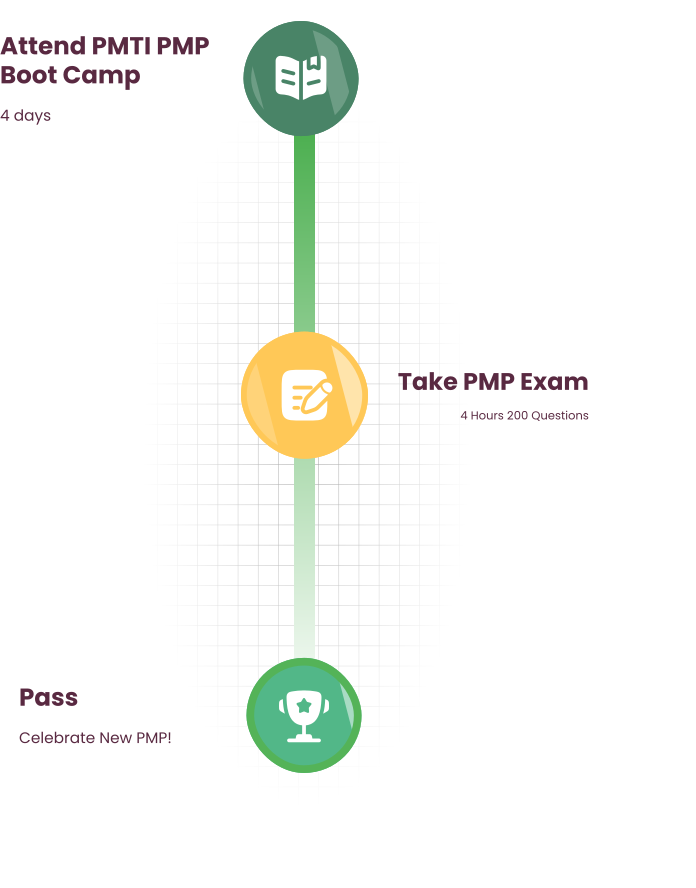
The PMP exam currently comprises 180 questions, and candidates are allotted 230 minutes (3 hours and 50 minutes) to complete it. These questions encompass various formats, including multiple-choice, multiple-select, matching, or fill-in-the-blank types.
Content Coverage

Content Coverage

The PMP exam assesses candidates' proficiency across three main domains: People (42% of the exam), Process (50% of the exam), and Business Environment (8% of the exam). Each domain encompasses various tasks and competencies essential for effective project management.
Agile and Hybrid Approaches

Agile and Hybrid Approaches

With the inclusion of agile and hybrid approaches, the PMP exam reflects the evolving landscape of project management practices. Candidates must demonstrate their understanding of agile principles, methodologies, and tools, as well as their ability to apply agile practices in project environments.
Exam Timing

Exam Timing

The PMP exam allows 230 minutes for candidates to complete the 180 questions. The exam is divided into three segments, each containing 60 questions. Candidates have the option to take a 10-minute break at the conclusion of the first and second segments.

For Enterprise

šŸ¢

Have more than Ā 8 to train!

What Do You Need to Pass the PMP Exam?

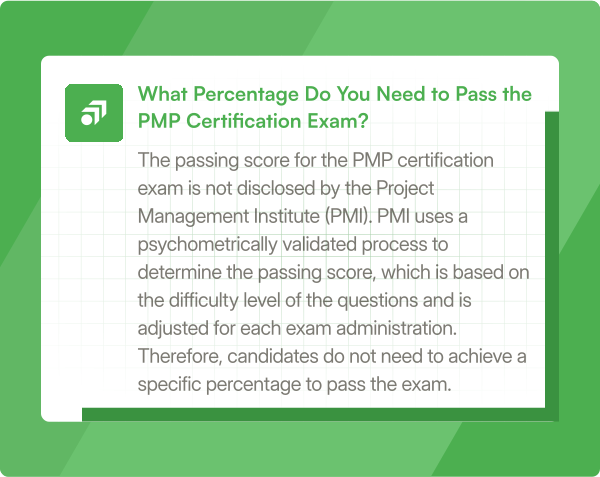
To pass the PMP exam, candidates need to achieve a minimum score determined by PMI. This score is not disclosed to candidates and is determined based on the difficulty level of the questions. To increase their chances of success, candidates should focus on the following:

Comprehensive understanding of the exam and its outline.

Preparing an effective study plan.

We provide both in-person and virtual courses andboot campsfor our prospective students

Practice and review by taking practice exams, and identifying areas of weakness to address.

Mentally preparing to pass the exam by maintaining a calm and focused mindset during the exam is essential for answering questions accurately and efficiently

PMP Exam Requirements

How to Prepare for the PMP Exam?

Preparing for the Project Management Professional (PMP) exam requires a strategic approach and diligent study. Here are some steps to help you prepare effectively:

Understand Exam Content

Familiarize yourself with the PMP exam content outline provided by the Project Management Institute (PMI). Understand the knowledge areas, tasks, and competencies covered in the exam.

Study Materials

Use reputable study materials, such as the PMBOKĀ® Guide, PMP exam prep books, and online courses such as PMI's PMP online PMP prep. Choose resources that align with your learning style and preferences.

Create a Study Plan

Develop a study plan that outlines what topics you'll cover and when. Allocate dedicated study time each day or week and stick to your schedule.

Practice Questions

Practice with PMP exam sample questions and mock exams to gauge your readiness and familiarize yourself with the exam format. Focus on understanding the rationale behind each answer.

Join Study Groups

Consider joining PMP study groups or forums where you can discuss concepts, share study tips, and collaborate with other exam candidates.

Take Practice Exams

Take full-length practice exams under timed conditions to simulate the exam experience. Analyze your performance and identify areas for improvement.

Review Weak Areas

Focus on strengthening your understanding of weak areas identified through practice exams. Review study materials, seek clarification, and ask questions as needed.

Manage Exam Day

Plan ahead for exam day by confirming your exam appointment, gathering required identification, and familiarizing yourself with the exam center location. Get a good night's sleep and arrive at the exam center early to minimize stress.

Get a free Counseling session

Still confused if you qualify for the PMP exam? Get a call back and we will answer all your questions!

CTA Image

What do you need to take the PMP exam?

Before you can take the PMP exam, there are several requirements you need to fulfill and items you need to have in place:

Eligibility

Ensure that you meet the eligibility criteria set by the Project Management Institute (PMI) to take the PMP exam. This includes having the required project management experience and education hours.

Application Approval

Pay the exam fee, which varies depending on whether you are a PMI member or non-member. You can make the payment online through the PMI website using a credit card or other accepted payment methods.

Exam Fee

Ensure that you meet the eligibility criteria set by the Project Management Institute (PMI) to take the PMP exam. This includes having the required project management experience and education hours.

Study Materials

Gather study materials and resources to help you prepare for the exam. This may include the PMBOKĀ® Guide, study guides, online courses, practice exams, and other relevant materials.

Study Plan

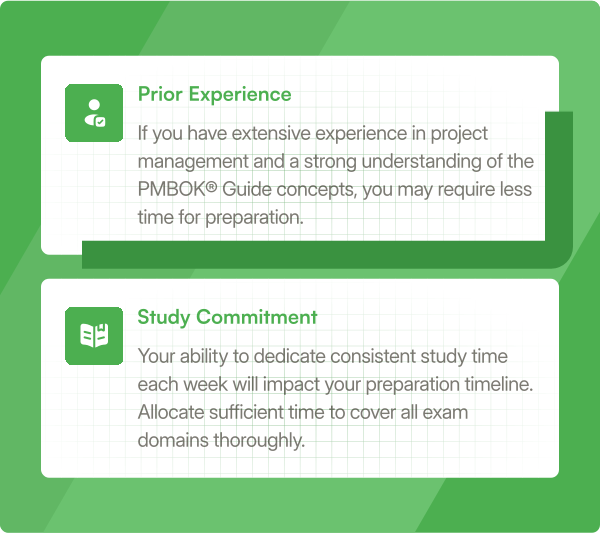
Develop a study plan that outlines your study goals, timelines, and study sessions. Allocate sufficient time each week to review exam content and practice answering sample questions.

Exam Appointment

Schedule your exam appointment through the PMI website once you're ready to take the exam. Choose a date, time, and testing center location that is convenient for you.

Identification

Gather study materials and resources to help you prepare for the exam. This may include the PMBOKĀ® Guide, study guides, online courses, practice exams, and other relevant materials.

Readiness

Ensure that you're mentally and physically prepared for the exam. Get a good night's sleep, eat a nutritious meal beforehand, and arrive at the testing center early to allow time for check-in procedures.

What to do the day before the PMP exam?

The day before your PMP exam is crucial for ensuring that you're mentally and physically prepared to perform at your best. Here are some recommendations on what to do the day before your PMP exam:

Review Key Concepts

Spend some time reviewing key project management concepts and processes. Focus on areas where you feel less confident or where you've identified gaps in your knowledge during your preparation.

Relax and De-stress

Take time to relax and de-stress to ensure that you're in the right mindset for the exam. Engage in activities that help you unwind, such as meditation, listening to music, or going for a walk.

Rest and Sleep

Get a good night's sleep to ensure that you're well-rested and alert on exam day. Aim for at least 7-8 hours of sleep to help you feel refreshed and mentally sharp.

Eat Well

Eat a nutritious meal the night before the exam and avoid heavy or greasy foods that may cause discomfort. Opt for light, healthy options that provide sustained energy and focus.

Stay Hydrated

Drink plenty of water throughout the day to stay hydrated and maintain optimal cognitive function. Avoid excessive caffeine or sugary drinks, as they may lead to energy crashes or jitteriness.

Visualize Success

Visualize yourself successfully completing the exam and achieving your certification goals. Positive visualization can help boost your confidence and motivation leading up to the exam.

Plan Your Exam Day

Plan your schedule for exam day, including the time you need to wake up, travel to the testing center, and complete any pre-exam check-in procedures. Aim to arrive at the testing center early to avoid any last-minute stress or rush.

Get Organized

Organize all the items you'll need for the exam, including your identification, exam confirmation details, and any other necessary documents. Ensure that you know the location of the testing center and plan your travel route accordingly.

What is required to maintain PMP certification?

Maintaining PMP certification requires adherence to PMI'sContinuing Certification Requirements (CCR) program. This program mandates that certified professionals must earn a certain number of professional development units (PDUs) within a specified timeframe to demonstrate ongoing competence and relevance in the field of project management. PDUs can be earned through various activities, such as attending training courses, participating in webinars, or engaging in volunteer work. By fulfilling the requirements of the CCR program, certified professionals can ensure the continued validity and value of their PMP certification.

Achieving PMP certification can significantly enhance your career prospects and credibility as a project management professional. Understanding the requirements and eligibility criteria for PMP certification is essential to navigate the certification process successfully.
Throughout this article, we've covered various aspects of PMP certification requirements and eligibility criteria, including education, project management experience, and formal project management education. We've also discussed the importance of PMP certification, the steps to obtaining it, and the resources available to support your preparation.

Preparing for the PMP exam requires dedication, effort, and strategic planning. By developing a structured study plan, utilizing quality study materials, and practicing sample questions, you can increase your chances of success on the exam.

Get in Touch with Us šŸ¤™